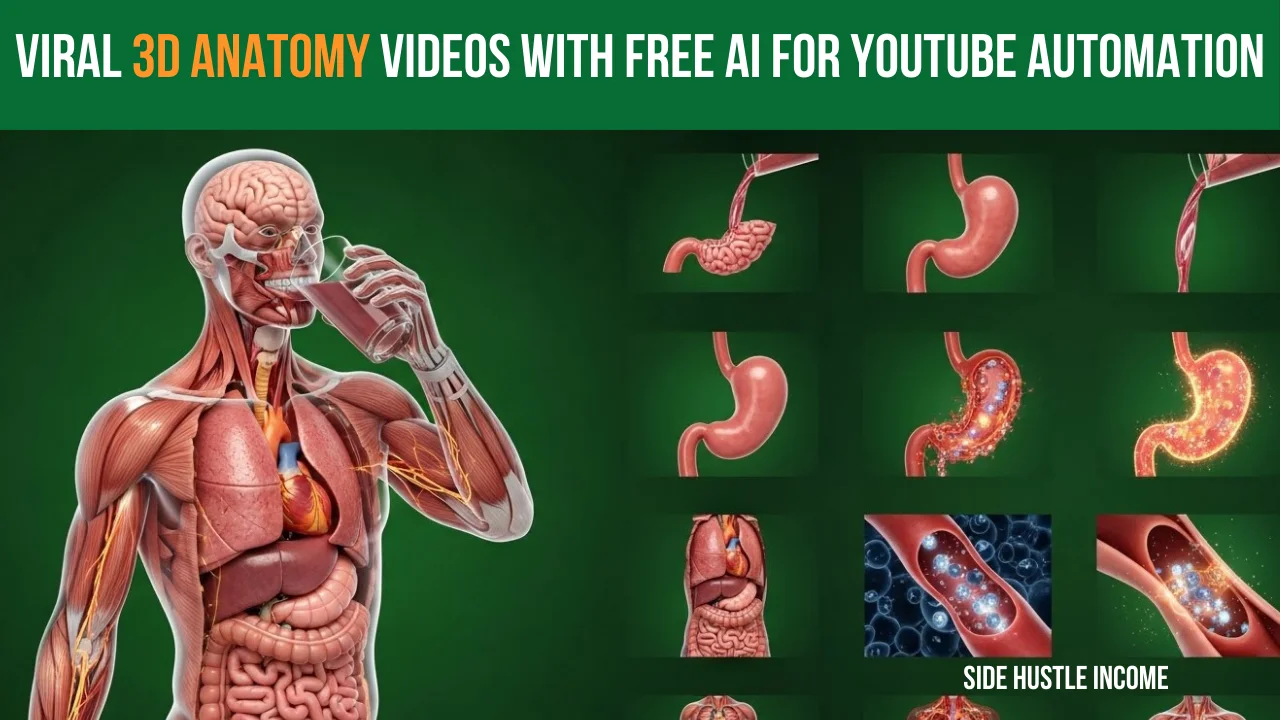
Have you seen those mesmerizing videos on TikTok where a person eats a fruit or drinks a soda, and the camera zooms inside their body to show the biological reaction?
That channel is called Science Craft, and they are pulling in 150 Million+ views with their incredible 3D Anatomy Videos.
Here is the secret: This niche is exploding on TikTok, but it is barely saturated on YouTube. This is your “first-mover advantage.” If you can replicate this style on YouTube Shorts, the potential for growth is massive.
In the past, these videos cost thousands of dollars to animate. Today, thanks to the power of YouTube Automation and AI, we can create them for free.
In this guide, we will break down exactly how to replicate the “Science Craft” style using AI tools to create high-quality, viral Shorts.
Table of Contents
ToggleStep 1: The Competitor Analysis
Before we build, let’s look at the blueprint. The channel Science Craft has mastered the art of “Anatomical Journeys.” They aren’t just making cartoons; they are making realistic 3D Anatomy Videos that captivate the audience.
- The Hook: Someone eats/drinks an item (e.g., Apple, Soda, Coffee).
- The Visual: A cinematic zoom into the stomach/body.
- The Content: Education mixed with visuals. Is it good for you? Is it bad? What happens to your stomach acid?
- The Stats: Videos routinely hit 20M, 30M, and even 150M views.
Step 2: The YouTube Automation Tool Stack
You don’t need a studio or expensive software. We are going to use a specific stack of AI tools to run this YouTube Automation channel effortlessly.
- DeepSeek (or ChatGPT): For generating prompts, scripts, and SEO data.
- AI Image Generator (e.g., Wisk, Midjourney, or Leonardo): To create the base frames for your 3D Anatomy Videos.
- AI Video Animator (e.g., Flow, Runway, or Pika): To turn static images into moving biological animations.
- Google AI Studio / ElevenLabs: For realistic, human-sounding voiceovers.
- Filmora (or CapCut): For final editing and assembly.
Step 3: The Master Prompt Strategy
The most critical part of this process is the Master Prompt. You don’t just ask for an image; you need a structured workflow to get that consistent “Science Craft” look.
The Workflow:
- Copy the Master Prompt: Use a specialized prompt that tells the AI to act as a medical director.
- Choose Your Background: The default is usually green (green screen style), but you can customize the prompt to make the background Grey, Black, or Blue depending on your channel’s aesthetic.
- Input into DeepSeek: Paste the Master Prompt into DeepSeek.
- Select Your Topic: DeepSeek will ask what food/drink you want to cover. You can choose from a list (Apples, Carrots, Coffee, Soda, etc.).
What happens next?
DeepSeek will generate a list of 10-15 detailed Image Prompts and corresponding Video Prompts. It does the heavy lifting for your YouTube Automation workflow.
Step 4: Generating Visuals & Animation
1. Create the Images
- Copy the Image Prompts generated by DeepSeek one by one.
- Paste them into your AI Image Generator (like Wisk).
- Important: Set your Aspect Ratio to 9:16 (Vertical format for Shorts).
- Download the best version of each image.
2. Animate the Images (Image-to-Video)
Static images are boring; to make viral 3D Anatomy Videos, we need movement.
- Go to your AI Video tool (like “Flow”).
- Select “Frame to Video” or “Image to Video.”
- Upload your first image.
- Copy the corresponding Video Prompt from DeepSeek and paste it.
- Settings: Keep ratio 9:16. If available, set motion to “3.1 Fast” or similar to ensure dynamic movement inside the stomach or body.
- Generate and download. Repeat this for all 10-12 scenes.
Step 5: The Script & Voiceover
1. Write the Script
Ask DeepSeek to write a “Short Narration Script” based on the visuals. It should be concise (approx. 60 seconds) and educational.
2. Clean the Script (Pro Tip)
Before generating audio, paste the script into a notepad.
- Remove Headings: Delete “Scene 1,” “Scene 2,” etc.
- Remove Punctuation: Remove excessive commas.
- Why? AI Voiceovers tend to take long pauses at commas. Removing them makes the voiceover sound faster, more energetic, and engaging for Shorts.
3. Generate Audio
Use a free tool like Google AI Studio or ElevenLabs. Paste your cleaned text, select a clear voice (avoid voices that speak too slowly), and download the MP3.
Step 6: SEO (Search Engine Optimization)
To get views, the algorithm needs to know what your video is about. Ask DeepSeek for an SEO Strategy for your specific topic (e.g., Carrots).
- Title: Get a catchy title (e.g., “The Anatomical Secret of a Carrot”).
- Hashtags: Use 3-4 specific tags in the title (e.g., #Shorts #Health #3DAnatomy).
- Description: Place relevant keywords here to help YouTube categorize your content.
- Tags: Fill your tags section with the keywords provided by the AI.
Step 7: Editing & Final Assembly
Open your video editor (Filmora/Premiere/CapCut).
- Import: Bring in your AI-generated 3D Anatomy Videos clips and your Voiceover audio.
- Sync: Align the video clips to match the narration.
- Mute Original Audio: Ensure the AI video clips are muted (they often generate weird background noise).
- Transitions: This is key for retention. Add Flash or Glitch transitions between every clip to keep the viewer’s attention.
- Export: Render in 1080p or 4k vertical.
Conclusion
You now have a high-quality, 3D-style animated medical video that looks like it cost a fortune to make, but you made it for free using AI.
This niche is wide open. If you start uploading these “Food Effect” 3D Anatomy Videos consistently, using proper SEO and high-quality visuals, you can dominate this category just like Science Craft did on TikTok.
This is the ultimate YouTube Automation blueprint for 2024. Ready to start? Pick your first food item (maybe an Apple?) and let the AI do the rest!
If you found this guide helpful, don’t forget to like and subscribe for more AI strategies!

Disclaimer
We’re not promising lottery winnings on Side Hustle Income. Your results will depend on how much time you put in. But here’s what we CAN promise – these are 100% free, legal ways to make real money from your couch. No funny business.
So… what are you waiting for? That money isn’t going to earn itself! 💸